Troubleshooting
Indexed by what you are seeing, not by which part of the application is responsible — at 20:55 nobody goes looking under "Timecode Sync".
Each entry is a short diagnosis and a link. The linked page has the full story; this page is for finding it fast.
Going live
GO LIVE is greyed out, or nothing happens when I click it
The button's tooltip is the reason. Hover it. There are five:
| Tooltip says | Fix |
|---|---|
Loading audio - please wait... |
Media is still being decoded. Wait; it finishes on its own |
Close the ISO Review window before going Live |
Close it — ISO recording |
Runner license required to GO LIVE |
Editor or Demo — Licensing |
Runner license expired |
Working without the internet |
| Anything naming the mixer | The engine is not connected — Connect a mixer |
If there is no GO LIVE button at all, you are Offline: no mixer is connected yet, so there is nothing to go live to. Full table in If GO LIVE will not arm.
I pressed GO LIVE, it armed, I confirmed, and we are still in Standby
Most likely a Show Pass that has not been started. The first GO LIVE of the run is refused on purpose: a dialog asks you to arm the pass, and you have to press GO LIVE again afterwards. In the room it reads as a broken button.
Press Arm Show Pass, then GO LIVE again — The Show Pass and the operational sequence.
The other three possibilities are an expired licence, a mixer engine that has gone down between the arm and the confirm, and an ISO Review window that was opened in between. All of them produce a Cannot Go Live dialog naming the reason.
A remote GO LIVE does nothing at all, with no message
Over OSC a refusal is silent — no dialog, no log line. Everything that would block the button blocks the remote command too, including the unstarted Show Pass. Try the button once to see the reason, then go back to the controller. GO LIVE over OSC.
My MIDI surface does nothing
MIDI bindings are not applied at launch. Open Settings > MIDI and press OK or Apply once, per session. Also: only note-on messages are read — control changes are ignored in silence. Binding.
During the show
We went into BREAK on our own
Three causes, in order of how likely they are to be yours:
- The mixer connection dropped. A drop while Live forces Break, with a toast saying so. HotPunch reconnects on its own at 0.5 s, then 5 s, then 30 s — but until it is back you cannot leave Break, because leaving re-runs every go-live precondition.
- Somebody pressed it. The BREAK button, or
Escape, with no arming step. Easy to do by reflex. - A programme mismatch. Only on a mixer HotPunch can actually read back — in practice only ATEM — and only once per Live session.
I cannot get out of Break
Leaving Break is not a toggle: it re-runs every condition for going live. If the mixer connection is what put you there, the button will keep refusing until the connection returns. Getting out of Break.
The playhead has stopped and the timecode reading is frozen
The incoming timecode went away. By default HotPunch freezes the playhead rather than guessing, and tells you with a red toast — there is no modal, and the operational state does not change, so it is easy to miss.
The alternative behaviour, running on the internal clock until timecode returns, is a project setting you have to choose before the show. When the timecode goes away.
I selected LTC (or MTC) and nothing is chasing
Selecting a source is monitoring. Chasing needs the Lock button armed — the incoming timecode is displayed either way, which is why this looks like it should already be working. The auto-play and auto-switch toggles only appear after you arm it. Nothing is chased until you arm Lock.
The show is running a few seconds away from everyone else
Check the drop-frame designation at both ends. Getting it wrong never fails loudly — it just
sits about 3.6 seconds per hour away from where the rest of the gallery thinks it is.
Confirm against the 29.97 DF reading in the Sync panel. Drop-frame.
I cannot open Settings, and I cannot reach the log
Both are blocked in Live and in Break, and a Settings window that was open is closed for you at GO LIVE. This is deliberate. Turn on file logging before the show. You cannot open Settings on air.
A camera key does nothing
Three reasons, in order:
- The number is above the configured Camera Count (default 8).
BandWare exempt. - You are on air. Inserting a cue on air is refused, and unlike most refusals it is silent.
- Something else has keyboard focus.
The mixer
HotPunch says connected, but the switcher never moves
Two things to separate.
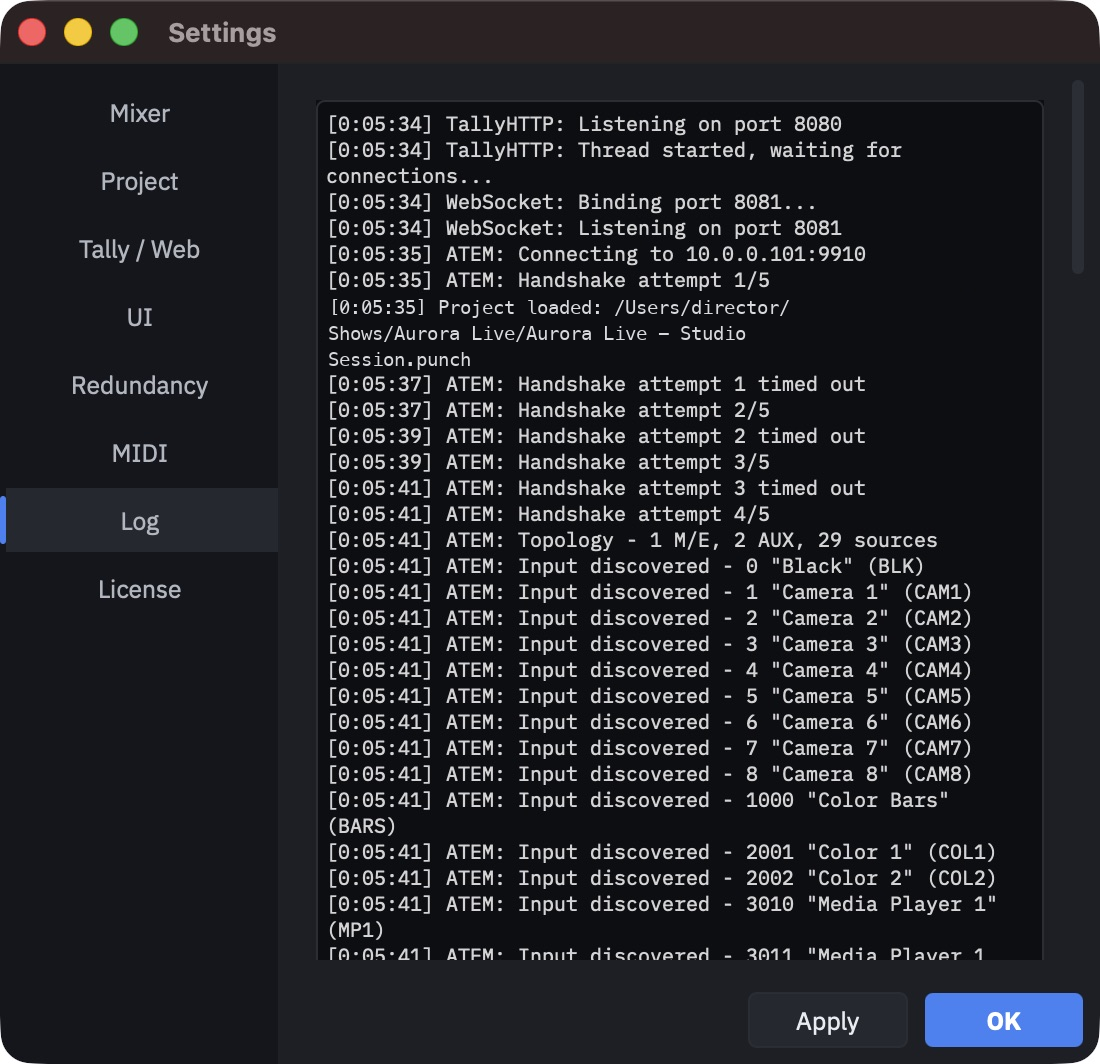
Is it really connected? For several protocols the indicator means "an address is configured", not "something answered". Watch the log in Standby: it shows the exact commands, including the physical input number after mapping. Verify before you trust it.
Is the address a trap? The literal word localhost — and an empty field — are treated as
"not configured". HotPunch does not attempt a connection and does not say so. Use
127.0.0.1. The procedure.
I get a cut where I asked for a wipe or a DVE
Your protocol does not support that transition, so HotPunch falls back. The reliable warning
is the amber hint in the cue editor (-> MIX (protocol fallback)), which every protocol
shows; the log line naming the fallback exists only on some.
Transitions your mixer cannot do.
Nothing warns me when someone touches the mixer panel by hand
Only ATEM reads state back from the switcher. The other engines report the last command they sent, which is not the same thing — so a manual change on the panel is invisible, and the automatic breakaway that would catch it never fires. Declared maturity.
Web viewers
The pages say STALE DATA, or PUBLISHER DISCONNECTED
They mean different things and they are two different phone calls.
- STALE DATA — that browser has lost its connection. One viewer affected: their network, their device.
- PUBLISHER DISCONNECTED — the machine producing the show has gone. Everyone affected.
- WAITING FOR PUBLISHER — nothing has ever published to this room.
A page loads but never updates, and stays on STALE DATA forever
The local page is always wired to the WebSocket, even if you only turned the HTTP server on. HTTP on with WebSocket off produces exactly this: a page that loads and never receives anything. Turn the WebSocket server on. Two ways to serve.
A viewer sees SERVER FULL
The local server accepts 32 viewers. The 33rd is turned away and retries slowly. A phone asleep in a pocket is still holding its slot. Thirty-two viewers, locally.
A dialog says the web relay is already in use
Another machine is publishing to the same cloud room. Take over moves the publishing, and nothing else — it does not change which machine is driving the mixer, and pressing it by reflex during a show is how two machines end up disagreeing. Two machines publishing the same show.
The operators cannot select cameras 17 to 20
The web picker stops at 16 while the application goes to 20. It is a real limit, not a setting. Cameras 17 to 20.
Redundancy
The backup took over and will not give control back
The failover is a latch, and there are exactly two ways out of it:
- Return Control to Primary on the backup — the primary is asked to confirm it is really able to drive, and only then does the backup stand down. If it refuses or does not answer within three seconds, the backup keeps driving. That is the safe outcome.
- End the show. The latch clears by itself when the machine leaves the on-air states.
Applying redundancy settings while a failover is active is refused, and the message names both routes. Getting control back.
If you used manual TAKEOVER rather than an automatic failover, the supervised handback is no longer available — plan to finish the show on the backup.
Both machines say they are driving
That is a SPLIT BRAIN banner, and it means the two machines cannot see each other while both can reach the mixer. Press Return Control on the backup. If the network is still cut the request will time out, and then you take the primary off the mixer by hand. Split brain.
A DUAL PRIMARY banner is a different thing: two machines configured as Primary. That is a configuration mistake, not a partition.
The backup woke up thinking it is the Primary
Redundancy settings live in the project file, including the role. Opening the project by hand on the backup overwrites its role with the primary's. Always push the project from the primary instead. Settings that travel.
The primary lost the mixer, but the backup did not take over
That is by design, and it is the limit worth knowing before you rely on the pair: failover triggers on the death of the machine, not on the loss of the mixer. A primary that is alive but disconnected goes into Break and keeps sending heartbeats, so the backup stays put. Use manual TAKEOVER. Failover.
Media, projects and files
I moved the project to another machine and there is no audio
Two separate causes, and you may have both.
- The media files are not where the project expects them. Paths are absolute and nothing is guessed at load. The Missing Media Files window offers Search Folder..., which matches by content and therefore reconnects renamed files — that is the one to use.
- The audio extracted from your video files does not travel. It lives in a per-machine cache, so the first open on a new machine rebuilds it. Do that before the crew arrives: extraction blocks GO LIVE.
The cached audio keeps being rebuilt
The cache limit resets to 10 GB every time the application starts, so a larger limit you set yesterday is not in force today, and the oldest entries get evicted. The media cache.
The frame rate field is greyed out
The timeline is the lowest of three levels that can own the rate, and a higher one is on by default. The control that works is in Settings > Project — or, if a mixer is governing, nowhere until you turn Follow mixer frame rate off. Frame rate governance.
Exporting and importing
The PDF is taking forever and I cannot open another project
PDF export runs in the background with a dialog you cannot cancel. While it runs, New,
Open and Close are refused with Finish the PDF export first. Saving still works.
Wait it out. While it exports.
Related: exporting a PDF by right-clicking a timeline in the sidebar switches to that timeline and pauses playback. Do not do it during a show.
Half the show is missing from my EDL
Dual M/E. The second bus goes into a twin file named ..._me2.edl, and only the export route
from the timeline sidebar writes it — File > Export > EDL silently gives you M/E 1
only. Dual M/E: the twin file.
The editor cannot find the dissolves in my EDL
They are there, as W000 nnn wipes. D is never written, and every transition type collapses
to the same wipe: the EDL carries the duration, not the kind. Export the CSV as well if
the kind matters. Transitions come out as wipes.
A CSV import rejected every row, or the timecodes split into two columns
Two different things:
- Rejected rows are listed in full in the alert — treat a wall of them as "this file is wrong" rather than reading each one. Cameras above the Camera Count are dropped one row at a time.
- Split timecodes come from a spreadsheet set to semicolon-separated CSV, the default in much of Europe. HotPunch separates fields with commas and uses the semicolon inside drop-frame timecodes.
The export warned me about 999 events
That is the CMX 3600 limit. The export continues anyway — there is no cancel — and event 1000 onwards will misalign in some editors. In dual M/E the count adds both buses together while each file contains one, so the warning can be a false alarm. The 999-event wall.
ISO recording and review
Nothing was recorded
Recording starts when you press play, and only then. Going live does not start it, so if the timeline was already running when you went live you are not recording. It also never records in Standby, by design. And a play within two seconds of a stop is ignored. What actually starts a recording.
One angle in the review is hours away from the others
That clip had no embedded timecode track, so it was treated as starting at zero. There is no message when this happens. It is the first thing to suspect when one tile is wildly out. How the alignment actually works.
A tile is stuck showing "proxy..."
Either the recording is still running — a file that is still growing is refused rather than truncated — or the proxy job failed. Failures are not written to the log, so a tile stuck on a progress bar is the only symptom. You cannot review a recording that is still running.
Not all my cameras are in the review
The grid grows with the session up to twenty slots and shows cameras 1 to 20. Cameras 21 and above are never displayed, even though the session dialog counts them. Up to twenty slots.
Licence
I cannot save or export, and I could yesterday
Either the machine is in Demo, or a licence has lapsed. Two common ways to get there without touching anything:
- Ten days without reaching the licence server. The check happens only at launch, so the demotion appears the first time you start the application after the tenth day.
- The system clock moved backwards. More than an hour back invalidates the grace period until the next successful online check. Never fix a timecode problem with the system clock.
The License page says Expired but everything works
A machine activated offline always reads Expired there, because the page's idea of
"valid" includes "the server confirmed it at some point". Nothing is wrong. Judge by the tier
pill and by whether GO LIVE is enabled.
The reverse also happens: the tier pill shows the plan written in the licence, not the plan you currently have. The GO LIVE tooltip is the honest signal. Reading the License page.
When nothing here matches
Two habits are worth more than any list.
Rehearse in Standby. Everything except the mixer actually accepting the commands is exercised there, and the log shows exactly what would have been sent — including the physical input number after mapping. Rehearse.
Turn on file logging before the show, not after something goes wrong. The log lives behind the Settings gate, and the Settings gate closes at GO LIVE.