Redundancy
Two machines running HotPunch, one show. The primary drives the mixer; the backup follows everything it does and takes over if the primary dies. This page covers how the pair is configured, what the backup is and is not allowed to do, what a failover actually changes, the two ways control comes back, and the failure mode where both machines end up driving at once.
What you need
- Two machines, both running the same build of HotPunch, both holding the same project.
- A network path between them carrying three ports — see Three ports.
- The same mixer reachable from both. The backup connects to it and stays silent; it cannot take over a mixer it cannot see.
- A licence on the backup that permits going Live. Redundancy itself has no licence gate, but a takeover is a transition to Live, and it is refused for the same reasons any GO LIVE is refused. A backup with an expired licence is a machine that will not save you.
- Ideally, the same tally HTTP port on both, or the peer's port written into the settings.
The shape of the pair
One machine is Primary and one is Backup. It is a fixed assignment, not an election: nothing negotiates it, and two machines both set to Primary is a configuration error the app will warn you about but not fix.
The primary emits a heartbeat five times a second carrying its operational mode, its current show and timeline, play state, position, frame rate and per-bus break flags. The backup answers each heartbeat with a state packet of its own, which is how the primary knows the backup is alive and, later, how the two negotiate handing control back.
The backup uses the heartbeat to chase the primary: it follows the show and timeline switch, the operational mode, play and stop, the playhead, and the per-M/E break flags. And while it chases, every command it produces is suppressed. A backup that has followed the primary into Live is still in dry run: it computes everything, logs everything, sends nothing. That muzzle is lifted only by a failover.
Two details of the chase worth knowing:
- If the backup cannot enter the mode the primary is in — no show selected, mixer not connected, licence problem — it logs the refusal and retries every five seconds. It does not give up, and it does not tell you loudly. Check the backup before the show, not during it.
- If the backup has its own external timecode locked, it ignores the primary's position and stays on its timecode. Otherwise it corrects whenever it drifts more than a tenth of a second.
Setting it up
Everything is in Settings > Redundancy, and the settings live in the project.
| Field | Default | Notes |
|---|---|---|
| Enable Active Backup | off | |
| Role | Primary | Primary / Backup |
| Peer IP | — | Despite the label, a hostname works: it is resolved to IPv4 wherever it needs to be compared |
| Heartbeat Port | 5599 | Base port; two more are derived from it |
| Failover Timeout (ms) | 1500 | Silence tolerated before the backup takes over. Values under 500 are clamped |
| Peer Tally Port | blank | The peer's tally HTTP port. Blank or 0 means "the same one I use" |
| Shared Secret | blank | Shared HMAC key. Must match on both machines; blank means unauthenticated |
The Status line below reads Redundancy not active, Peer: ONLINE, Peer: OFFLINE, or
FAILOVER ACTIVE, and refreshes twice a second. It is the fastest pre-show check there is.
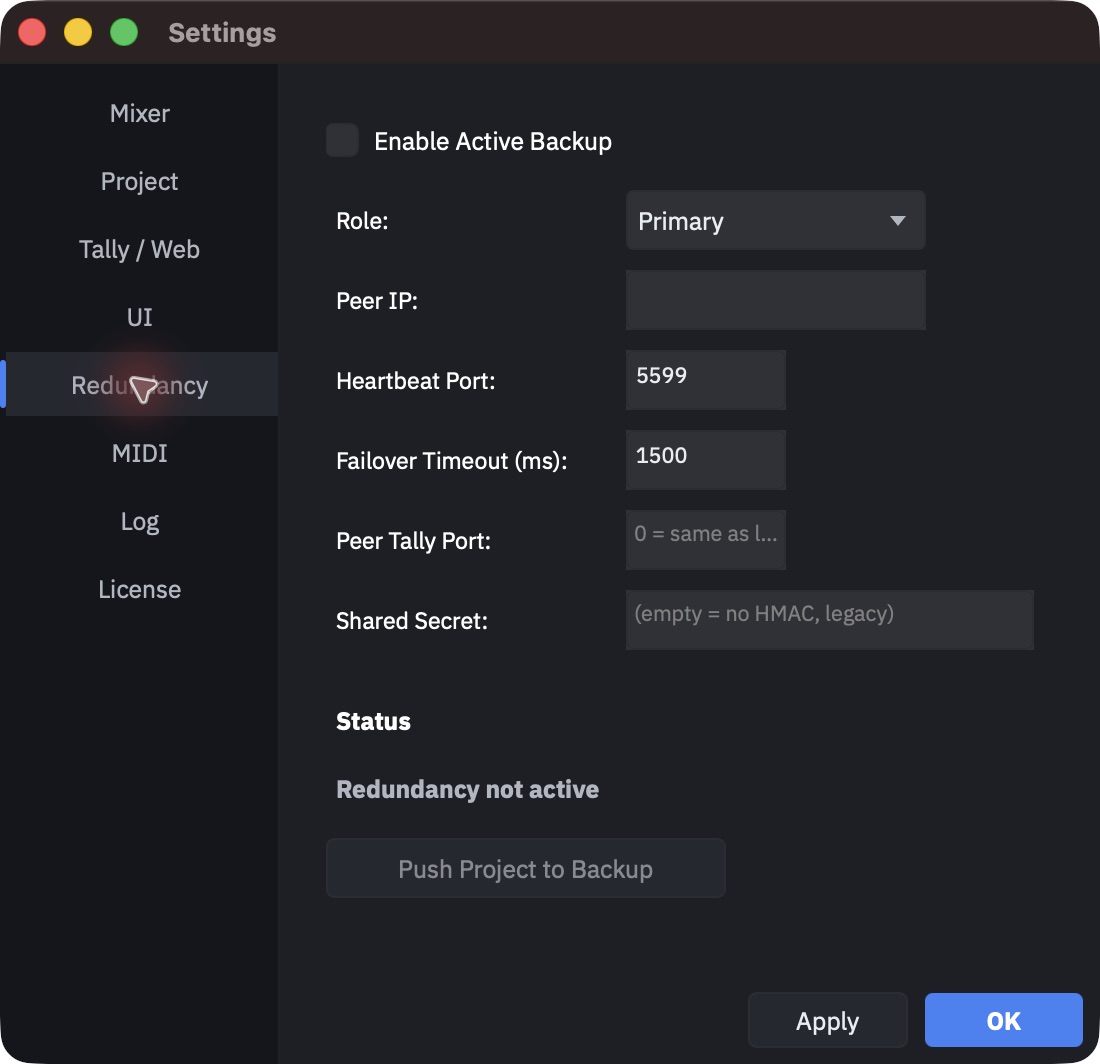
Redundancy starts when you press Apply, and also on its own at app launch and whenever a project is opened, if the project says it is enabled. You do not have to visit Settings to re-arm it after opening a show file.
Warning
Every project load stops redundancy first and restarts it afterwards. During a large project load the pair is briefly not covered.
Three ports
The pair uses three ports derived from the one you configure. Firewalls and VLANs need all three.
| Port | Protocol | Who listens | Carries |
|---|---|---|---|
heartbeat (5599) |
UDP | Backup | The primary's heartbeat, five times a second |
heartbeat + 1 (5600) |
TCP | Backup | Project file transfer |
heartbeat + 2 (5601) |
UDP | Primary | The backup's state packet, one per heartbeat |
The primary also tries to listen on the heartbeat port itself, purely so it can notice another primary shouting on the same configuration. If that bind fails — most often because something else on the machine already holds the port — the check is silently off and everything else still works.
Getting the project across
The two machines must hold the same project, and HotPunch will do it for you.
- Automatically, whenever the backup comes online and the primary is not on air. The primary exports a snapshot and pushes it over the TCP port.
- Manually, with Push Project to Backup in the Redundancy tab. The button is only present on the primary, and only enabled while the peer is online.
Two refusals are built in, and both are correct:
- The primary does not auto-push while it is Live or Break. Exporting the project is a synchronous operation on the UI thread, and stalling a live machine to feed a backup that just reappeared is a bad trade. Push manually, before the show.
- The backup refuses a push while it is itself on air, answers with a failure rather
than a success, and shows
Project push ignored - on air. A push replaces the project underneath a running show; it is not something to discover mid-programme.
The transfer is acknowledged only when the backup has actually finished loading the project, not when the bytes arrive. If the load does not complete within thirty seconds, the primary is told the push failed. After a push, the backup restores its own redundancy settings — the file it just received says "Primary", and it does not adopt that role.
Failover
The backup takes over when the heartbeat stops for longer than the failover timeout, having seen it at least once. There is no vote, no grace period beyond the timeout, and no confirmation.
At the moment of takeover the backup:
- transitions itself to Live if the primary was on air;
- turns dry run off — from here it is driving the mixer;
- discards its idea of the mixer's expected state and re-asserts the current cue as a cut. A primary that died halfway through a mix does not leave the mixer stranded mid-transition;
- raises a persistent red banner:
FAILOVER ACTIVE - This machine is now controlling the
   mixer
.
If the primary was Live but the backup cannot go Live — licence, mixer connection, ISO Review window open, no show selected — the failover still latches, but nothing is driving the mixer. The log says so explicitly and asks you to fix the blocker and GO LIVE by hand. This is the state that makes a pre-show check of the backup non-negotiable.
Warning
Failover triggers on the death of the machine, not on the loss of the mixer.
If the primary stays alive but loses its connection to the mixer, it drops into Break and keeps sending heartbeats. The backup sees a healthy peer and does not take over. Both machines are now up, and neither is driving. This is a known and deliberate boundary, not an oversight — the alternative, taking over whenever the primary reports a mixer problem, hands the show to a machine that may have exactly the same problem.
If it happens, the manual TAKEOVER button on the backup is the answer.
Manual takeover
A red TAKEOVER button appears in the main window of a machine configured as Backup, whenever a failover is not already active. It asks first:
Take over mixer control from the primary machine?
This will immediately start sending commands to the mixer.
Confirm and the backup does everything a failover does.
Warning
A manual takeover shuts down the heartbeat listener for good. The backup will never see the primary again, which means the supervised failback below is not available: the only way back is to restart redundancy from Settings, and Apply is refused while a failover is active. Plan on ending the show on the backup.
Getting control back
A failover is a latch — it does not release itself because the primary reappeared. There are two ways out.
1. Hand it back, supervised
Return Control to Primary, in the Redundancy tab and on the failover banner.
The backup asks; the primary answers. The primary accepts only if it is already driving, or if it can transition to Live right now. Only when the answer comes back "accepted" does the backup put itself back into dry run and re-arm its listener.
- If the primary refuses — most often because it cannot go Live — the backup keeps
driving and tells you why:
Primary cannot go Live (check licence, mixer connection and media). - If the primary does not answer within three seconds, the backup keeps driving:
Primary did not answer in time - this machine keeps driving the mixer.
That asymmetry is the whole point. A handback that fails leaves the show running on the machine that is already running it. There is no path through this negotiation that ends with nobody driving the mixer.
When the command is unavailable, the reason it gives is precise:
| You see | Meaning |
|---|---|
| "…available on the backup machine only." | You are on the primary |
| "This machine is not driving the mixer - there is nothing to hand back." | No failover is active |
| "Primary is not online - this machine keeps driving the mixer. Restart redundancy from Settings once the primary is back." | The peer is not reachable, or you did a manual takeover |
| "A Return Control to Primary request is already in flight…" | Wait three seconds |
When the primary comes back on its own while the backup is still driving, you are told once,
without drama: Primary is back online but this machine is still driving the mixer. Use
Return Control to Primary when you are ready. Nothing switches behind your back.
2. End the show
When the machine leaves the on-air area — Live or Break back to Standby — the latch is cleared and the listener is re-armed automatically. You do not have to remember to reset anything between shows.
While a failover is active
Apply in the Redundancy tab is refused, with the reason and both ways out:
Failover is ACTIVE - this machine is driving the mixer.
Redundancy settings were left untouched. Use Return Control to Primary to hand control back, or end the show: the machine re-arms itself when it leaves Live.
Split brain
Split brain is both machines driving the same mixer at once. It happens when the network between them is cut but the mixer is still reachable from both: the backup sees silence, concludes the primary is dead, and takes over — while the primary is happily still cutting.
HotPunch detects it and says so on both machines, with a persistent red banner:
SPLIT BRAIN - both machines are driving the mixer. Use Return Control to Primary on the backup.
The banner will not go away when you press DISMISS. It clears when the condition clears — that is the point of it. Underneath, the failover banner reappears on whichever machine is still latched.
What to do: on the backup, use Return Control to Primary. If the network is still cut the request will time out and the backup will keep driving — in which case take the primary off air by hand and let the backup finish the show.
Note
A different alarm, easy to confuse with this one, is DUAL PRIMARY: a toast reading "DUAL PRIMARY detected - another primary is sending heartbeats. Check the redundancy roles on both machines." That is not split brain, it is a configuration mistake — two machines both set to Primary. Fix the role on one of them.
Losing the peer without a failover
When the peer simply goes away and no takeover follows — a backup switched off, a cable
pulled during setup — you get a status-bar segment and a single toast, Backup peer offline,
and nothing else. No modal, nothing blocked. Losing redundancy is not an emergency and must
not interrupt an operator who is working.
The toast appears in Standby, Live and Break; it is suppressed only when the machine is fully Offline. The wording is the same in both directions, so a backup that loses its primary is also told "Backup peer offline".
The web viewers
Redundancy gives the crew a stable address, and it gives their browsers a way to follow the show when the machine underneath changes.
Point the browsers at the backup's tally address. While the backup is standing by, its HTTP server answers with a redirect to the primary, so everyone lands on the machine that is actually producing the show. Viewers already connected when the primary dies do not need to be reloaded by hand: they learn the backup's address from the primary while it is still alive, notice the death when their reconnection attempts run out, and move themselves.
The Peer Tally Port setting is what carries the backup's address into that mechanism. Leave it blank when both machines use the same tally port; fill it in when they do not — it is the one redundancy setting the viewers depend on.
What the viewers actually do, how long they take, and what they show while they are doing it is in What happens to viewers when the primary dies. The overlays and the publisher conflict are on the same page.
Before the show, on the backup
A backup nobody checked is a backup that does not exist. Five minutes:
- Redundancy enabled, role Backup, peer address and ports matching the primary.
- Status reads
Peer: ONLINE. - The project on the backup is the one you are about to run — push it from the primary and watch the confirmation.
- The backup's mixer connection is up, and its licence permits going Live.
- The backup follows the primary: press play on the primary and watch the backup's playhead move.