Connect a mixer
Everything up to now worked without hardware. This is where the timeline stops being a document and starts being a command source.
HotPunch is protocol-agnostic by design: the timeline, the cues, the transitions and the cue sheets know nothing about which switcher you own. A protocol engine translates them at the last moment. Adding a mixer means picking an engine and telling it where the device is — nothing about your show changes.
What does change is how much you can trust the result, and that varies sharply between engines. Read Declared maturity before you pick.
The procedure, for any protocol
Open Settings (the gear at the foot of the icon rail, or Cmd+,) and go to the
Mixer tab.
- Protocol — pick your engine. The one-line description under the combo tells you the transport and the port it expects; it turns amber when the protocol is experimental.
- Host and Port — for network engines. The port pre-fills with that protocol's default when you change the protocol, so change the protocol first and the port after. Serial engines hide these two fields and offer a port picker instead.
- M/E — which bus on the mixer HotPunch drives. Hidden on single-M/E devices.
- Camera count — how many camera sources this production uses, 1 to 20, default 8.
This is what fills the source palette, the
1-9/0shortcuts and the camera list in the cue-sheet filter. It lives here, not in the Project tab. - Apply or OK.
Apply is what connects. There is no separate Connect button. HotPunch tears down any
existing connection, opens the new one behind a Connecting to ... dialog, and on success
moves you from Offline to Standby automatically. On failure you get a
Connection Failed alert and stay Offline.
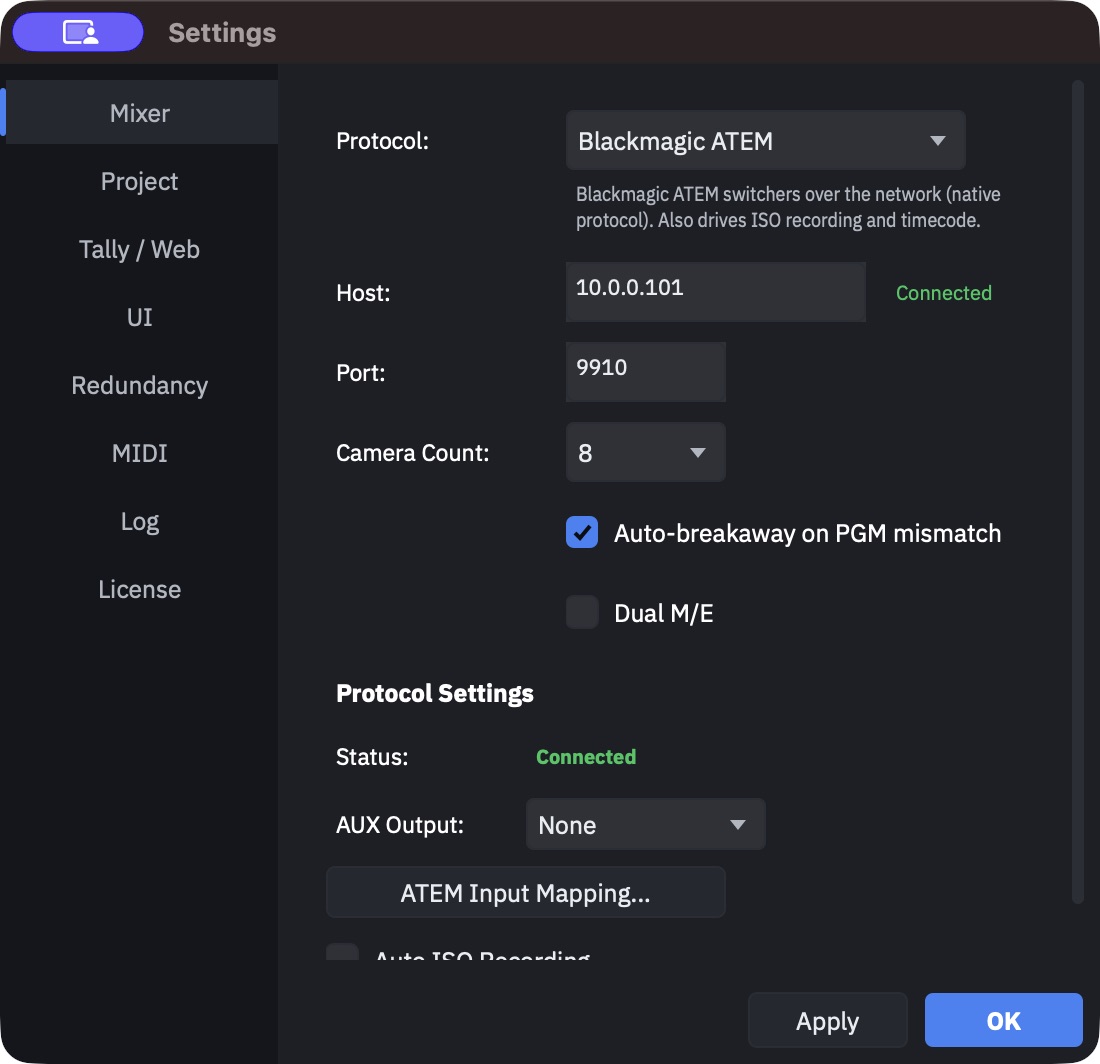
The localhost trap
The Host field ships with the literal text localhost, and HotPunch treats that
exact word — and an empty field — as "not configured yet". It will not attempt a
connection, and it will not tell you why: no dialog, no error, still Offline.
If your control surface really is on this machine (a Companion instance, a
serial-to-IP gateway running locally), type 127.0.0.1 instead. It connects.
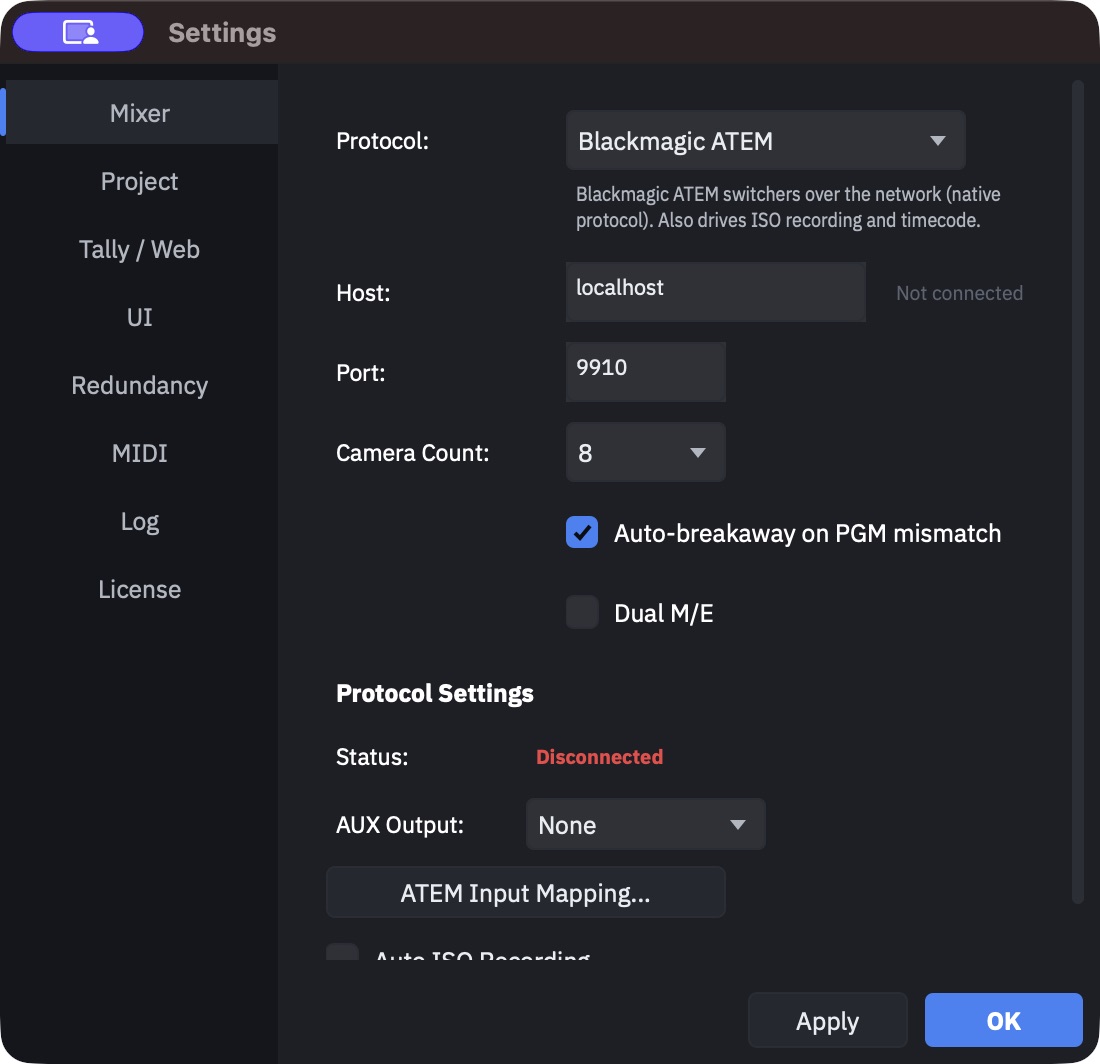
Applying again with the protocol, address and port unchanged keeps the existing connection instead of dropping and rebuilding it. Change any of the three and it reconnects. The connection is also re-established automatically when you open the project and when the app starts.
Declared maturity
The combo marks six of the eight engines (Experimental). That flag is not decoration: only one engine in HotPunch has ever been validated against real hardware.
| Protocol | Transport | Default port | Flagged | Reads state back from the device |
|---|---|---|---|---|
| Blackmagic ATEM | Network | 9910 | — | Yes |
| Bitfocus Companion (OSC) | UDP | 12321 | — | No |
| Roland V-60HD | TCP | 8023 | Experimental | No |
| Panasonic AV-HS410 | TCP | 60040 | Experimental | No |
| FOR-A HVS | WebSocket | 8621 | Experimental | No |
| Datavideo DVIP | TCP | 9001 | Experimental | No |
| Ross Carbonite/Ultrix | RS-422 serial | — | Experimental | Attempts to, unverified |
| Grass Valley Kahuna | TCP gateway (default) or RS-422 serial | 4000 | Experimental | No |
Ports marked here are what HotPunch pre-fills. Ross and Kahuna set theirs inside their own protocol block instead of the shared Host/Port fields.
"Reads state back" is the column that matters most, and it is not the same as "connects". Every engine reports a mixer state to HotPunch — but for Roland, Panasonic, FOR-A and Datavideo that report is an echo of the last command HotPunch itself sent, not a query of the device. Companion (OSC) and Kahuna report nothing at all: OSC is a one-way datagram stream.
The consequence is concrete: a change made by hand on the mixer panel is invisible to HotPunch on every engine except ATEM. Automatic breakaway on a PGM mismatch (see Running the show) can only fire where the state is genuinely read back. On everything else it never triggers, no matter how the toggle is set.
The Ross engine polls the device for program and preview, but its command vocabulary has no identified source — an audit could not match it to any published Ross protocol. Treat the Ross engine as unproven in both directions until it has been on a switcher.
Warning
Nothing outside ATEM has been confirmed on real hardware. Rehearse against your own device, in Standby, before the first show — and keep a manual path to the switcher for the whole beta.
Per-protocol notes
Only ATEM, Companion, Ross and Kahuna add a Protocol Settings block below the common fields. The rest are configured entirely by address and port.
Blackmagic ATEM
Native protocol over the network. The only engine validated in production, and the only one that reports program, preview, transition position, input names and mixer topology back to HotPunch. It is also the only engine that drives ISO recording and reports its frame rate, which HotPunch can adopt for the timeline.
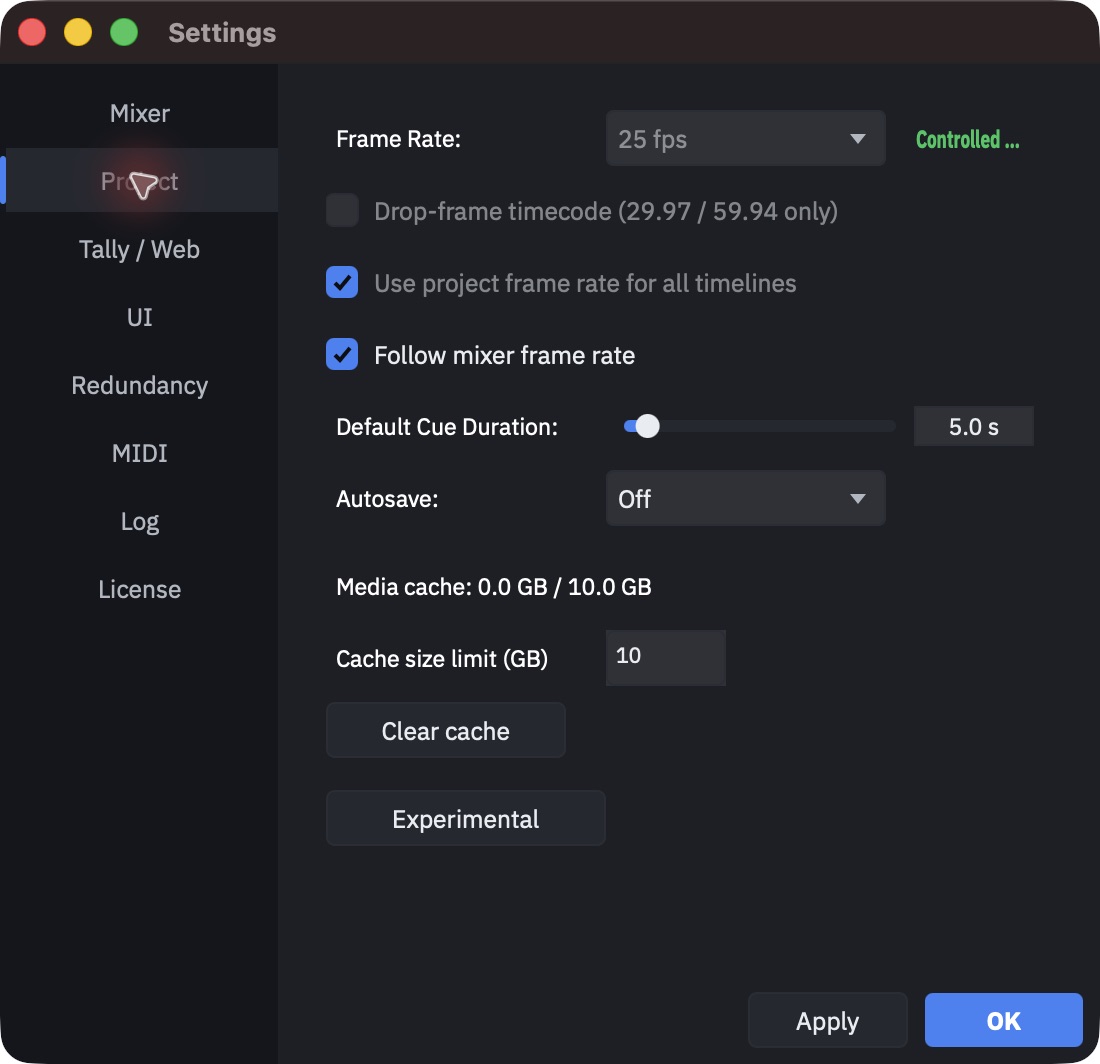
Its settings block offers an AUX output to mirror program to, an Auto ISO Recording toggle, a live connection indicator, and the ATEM Input Mapping... button.
Bitfocus Companion (OSC)
HotPunch sends OSC to a Companion instance, and Companion drives whatever it drives. This is the way to control a switcher HotPunch has no engine for — and the reason a device missing from the table above is not a dead end.
The settings block prints the exact address schema HotPunch emits (.../press presets for
CUT and AUTO, a preset page for preview crosspoints, and a custom variable for the
transition rate) so you can build the matching Companion buttons. There is also a
fallback presets toggle for setups that cannot take a continuous rate variable and need
quantised transition rates instead.
Because OSC is fire-and-forget, HotPunch cannot tell whether a command landed. The connection indicator says "connected" as soon as an address and port are configured — it is not evidence that anything is listening. The log is your only confirmation, so rehearse with Companion's own button feedback in view.
Roland V-60HD
ASCII command protocol over LAN. Crosspoints, cut, auto-transition and transition time are implemented; tally and state read-back are not.
Panasonic AV-HS410
STX/ETX ASCII on TCP 60040. The mixer needs its network plug-ins enabled to answer at all. HotPunch detects the model and adapts, since the AV-UHS500 and AW-HS50 speak measurably different dialects.
FOR-A HVS
Undocumented WebSocket interface; enable the Ext Interface editor on the switcher first. HotPunch speaks the HVS-100/110/390 dialect and there is no control to change that, so an HVS-2000 or HVS-490 will not respond correctly. The manufacturer's documented path is a serial editor protocol, not this one, and a FOR-A firmware update can break it.
Ross Carbonite/Ultrix
RS-422 serial: pick the port from the list (Refresh rescans) and set the baud rate. No host or port fields — they disappear for serial engines. Has an Input Mapping... button.
Grass Valley Kahuna
GVG100 editor protocol. Its settings block chooses the transport — TCP through a serial-to-IP gateway (the default) or RS-422 serial — and carries its own gateway IP, gateway port, serial port and baud rate. Fill those in, not the shared Host and Port fields above, which only appear or disappear in step with that combo. It also exposes an auto-transition trigger variant, because the GVG100 documentation contradicts itself about which byte sequence starts an auto: if AUTO does nothing on your unit, try the other variant. Confirm the crosspoint map on the switcher.
Input mapping
HotPunch numbers sources CAM 1..n, BLACK, WHITE, MP 1 and MP 2. Your mixer numbers its physical inputs however it likes. Input mapping is the translation table, and by default it is 1:1.
Only two engines have it: ATEM and Ross. It is a button inside that protocol's settings block, not a general Mixer-tab entry. On the other six protocols the mapping is fixed and your camera plan has to match the mixer's input numbering.
ATEM requires an active connection to open it. The window is populated from the input
list the ATEM reports — the actual labelled inputs, not a guessed range — so with no
connection you get Please connect to an ATEM first to discover available inputs. Connect,
then map.
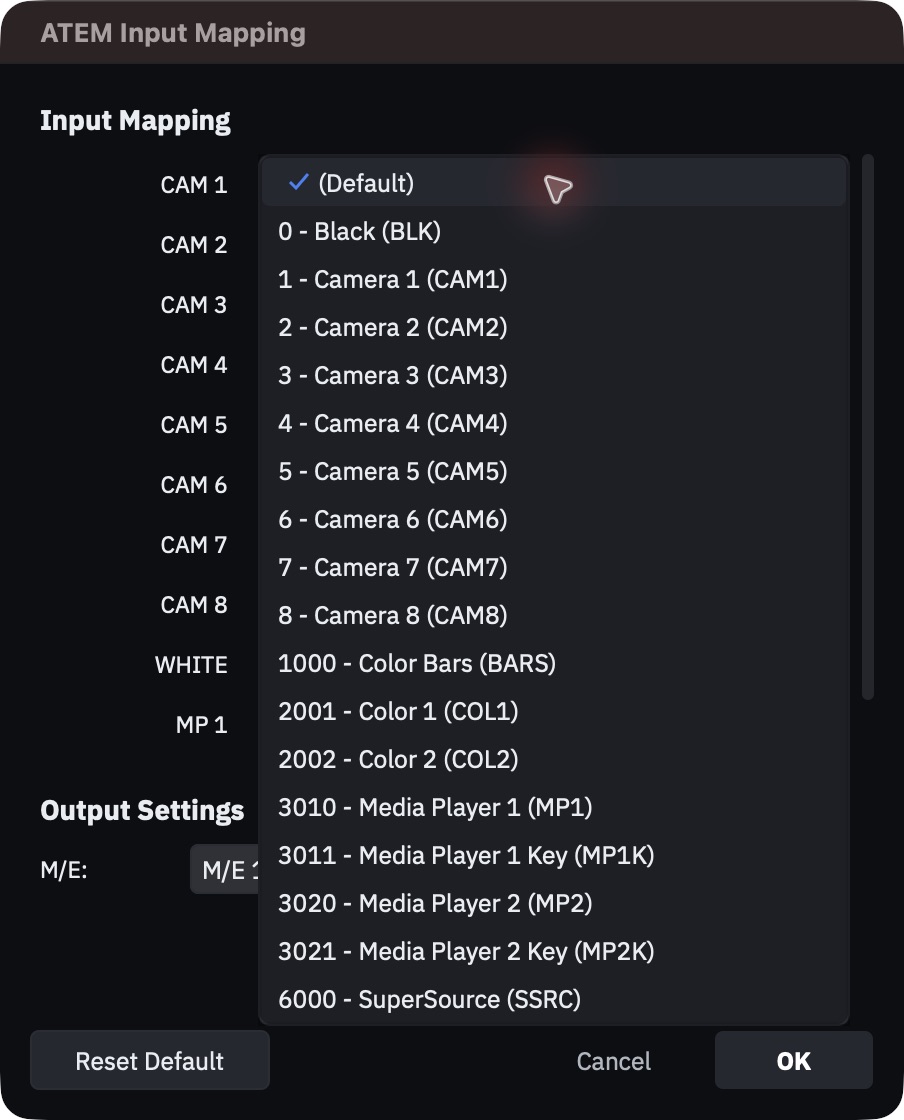
The two windows behave differently:
- ATEM Input Mapping lists CAM 1..n, WHITE, MP 1 and MP 2 (BLACK is fixed and not
shown). Nothing is saved until you press OK; Cancel closes without saving, and
Reset Default puts every row back to
(Default)(still pending until OK). Its Output Settings > M/E combo is the same M/E bus selection as the Mixer tab, listing only the M/Es the ATEM reports. - Input Mapping - engine name (Ross) lists Camera 1..n, Black, White, Media Player 1 and Media Player 2, and applies immediately: there is no OK or Cancel, each change goes straight to the live engine and into the project. Only one such window exists at a time; opening it for a different engine closes the other.
Both windows are independent of the Settings window and do not close with it, and both scroll when the rows do not fit (the ATEM window has a fixed size; the Ross window sizes itself to your camera count).
Transitions your mixer cannot do
Engines declare which transitions they support, and they do not all support six.
| Engine | Supports |
|---|---|
| ATEM, Ross | CUT, MIX, DIP, WIPE, DVE, STING |
| Datavideo | CUT, MIX, WIPE, CLIP |
| Companion, Roland, Panasonic, FOR-A, Kahuna | CUT, MIX |
A cue asking for something the engine cannot do is not an error and does not stop the show: HotPunch walks down a fixed chain — STING, DVE, CLIP, WIPE, DIP, MIX, CUT — and uses the first supported entry. A STING on a Roland becomes a MIX; a DVE on a Companion setup becomes a MIX.
When you change protocol, HotPunch counts the cues this will affect and tells you before you commit: "14 cues use DVE — will fall back to MIX". Read that dialog. It is the only warning you get, and after it the fallback happens silently at every cue.
Transition rates are clamped the same way, to each engine's own minimum and maximum.
Verify before you trust it
Connecting is not the same as controlling. Four places tell you the truth, in increasing order of usefulness:
- The status line beside the Host field in the Mixer tab: connected, connecting, reconnecting, connection error, or not connected.
- The mixer segment of the status bar in the main window, which names the protocol and the host it reached. Click it to jump back to Settings.
- An fps mismatch badge under the master timecode when the mixer reports a frame rate
different from the project's — amber, reading
MIX 29.97 != PRJ 25. See Settings for who wins. - The log, which is the only place that shows the actual commands. That is what Rehearse is for, and it is the step you should not skip.
If the connection drops, HotPunch retries on its own with a backoff of 0.5 s, then 5 s, then every 30 s. What a drop does to your show depends on the state you are in, and that is covered in Running the show.