Dual M/E
Dual M/E lets one timeline drive two mix/effects buses from two independent sets of cues — a programme cut on one and a keyed layer, a secondary feed or a stream mix on the other. This page is deliberately short: it covers how you turn it on, the one constraint that will refuse your settings, and how the timeline behaves afterwards. Everything else that changes is listed at the bottom with a link to the page that owns it.
What you need
- A mixer with more than one M/E, and a protocol that can address the second one. If the Mixer tab does not show an M/E selector at all, the connected protocol reports a single M/E, and both lanes will address the same physical bus. Check Declared maturity before you build a show on it.
- Nothing else. Dual M/E is a project setting, available on every licence tier including Demo.
Turning it on
Settings > Mixer > Dual M/E. The setting is stored in the project and is off by default.
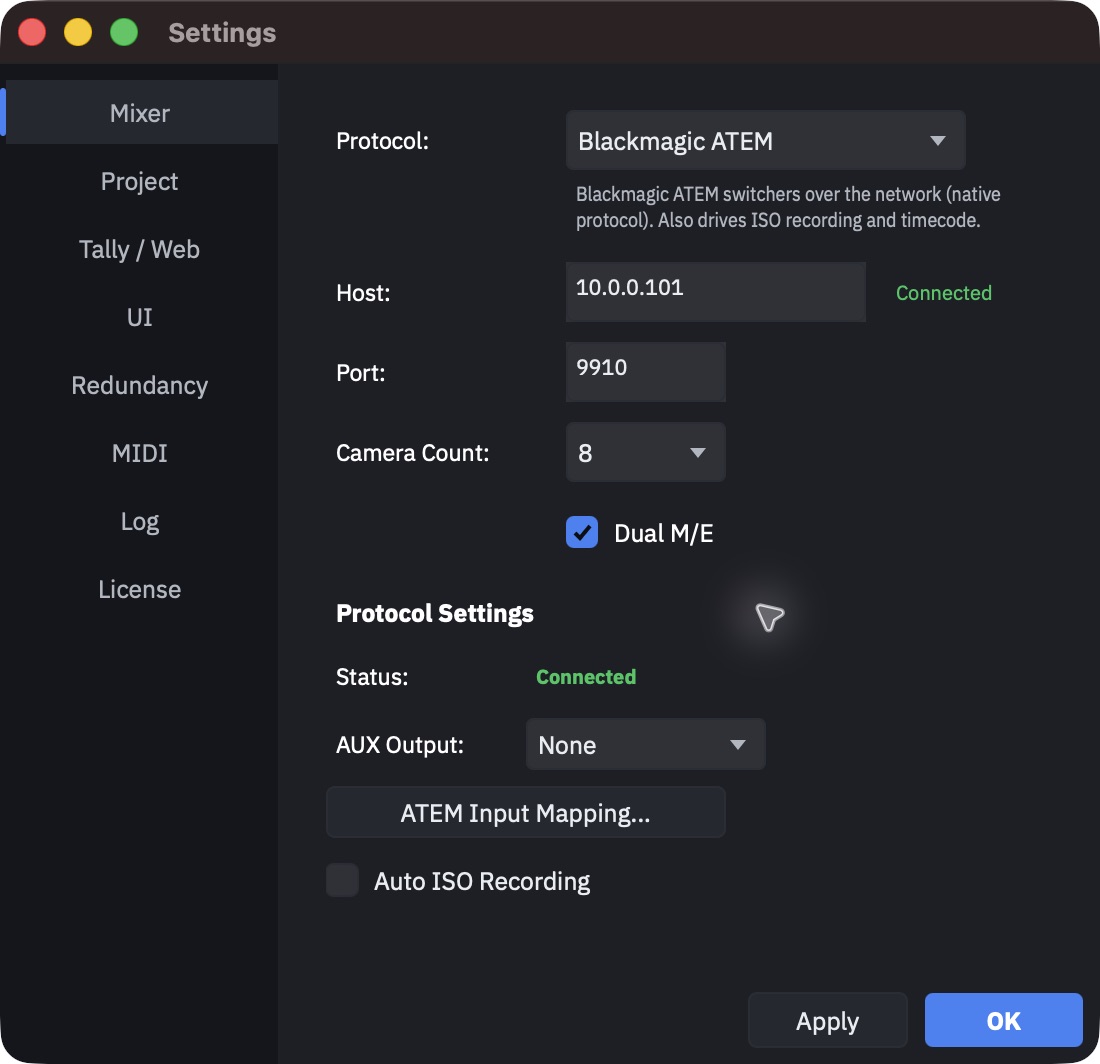
Two selectors decide which physical buses the two logical ones map to: M/E 1: and M/E 2 Bus:. They exist only when the protocol advertises more than one M/E (a single-M/E switcher, like the ATEM in the screenshot above, shows neither), and their defaults are physical M/E 1 and M/E 2 respectively.
Warning
M/E 1 and M/E 2 cannot point at the same physical bus. Set them the same and an amber "Warning: same physical M/E as M/E 1" appears under the selector immediately; on Apply the change is refused outright with a dialog titled Invalid M/E Configuration, and the three M/E fields are left as they were. Everything else on the tab still applies, so it is possible to press Apply, get the warning, and have half of what you intended take effect.
What changes on the timeline
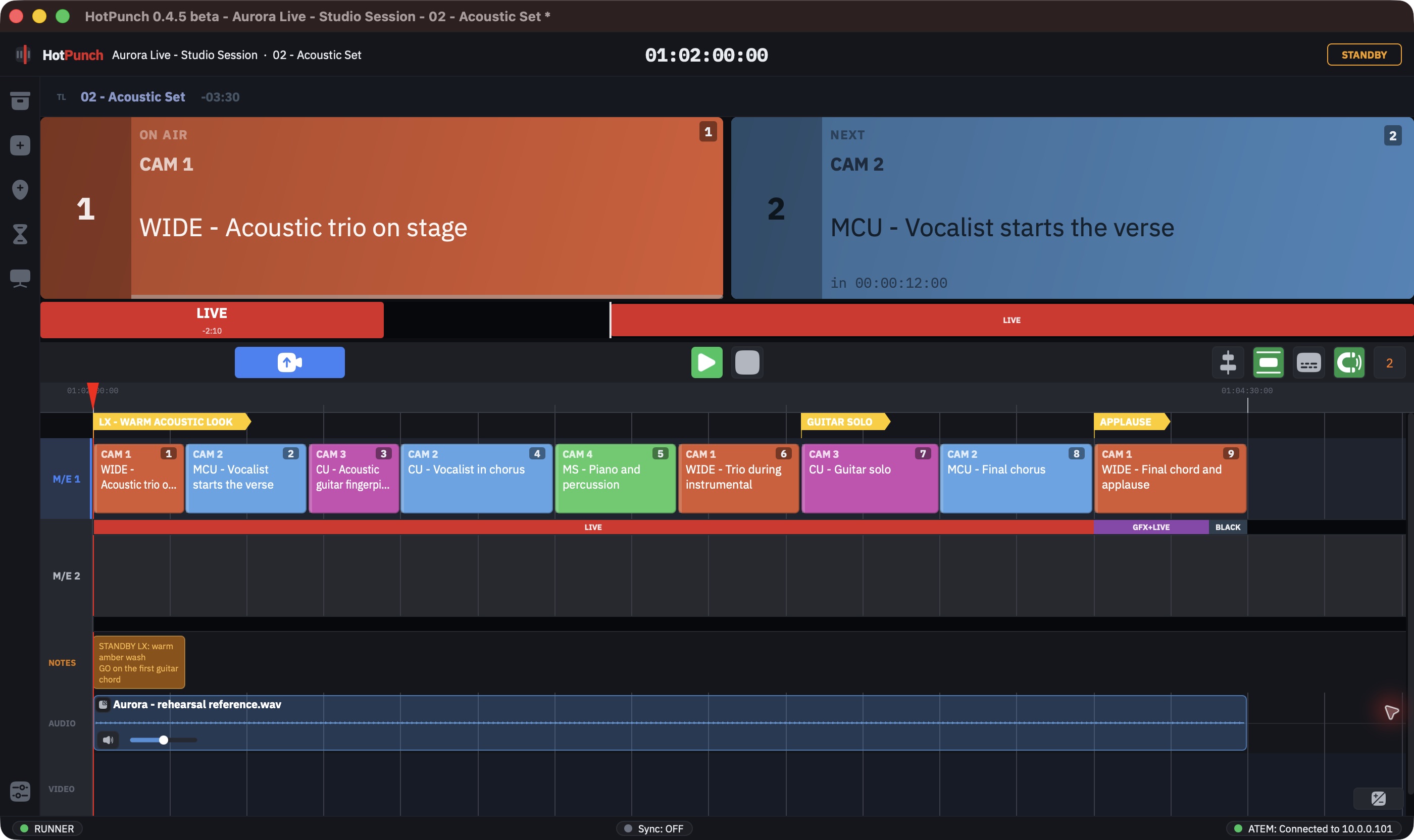
There is no M/E selector in the toolbar. The orange 2 that appears at the right end of the transport bar with Dual M/E on is not one: it is a toggle (tooltip Show M/E 2 On Air and Next boxes) that adds M/E 2's own ON AIR / NEXT boxes to the main window. Both lanes are drawn, always, one above the other, and you work in whichever one is active. To change the active lane:
- press Tab, or
- click the lane header on the left, or
- click any clip in the other lane.
The active lane is marked by a coloured header — blue for M/E 1, amber for M/E 2 — a bar down its right edge, and a very faint tint across the row. The inactive lane is not dimmed and its cues are not greyed: read the header, not the clips.
Note
Changing lane clears the current selection. That is also true when you change lane by clicking a clip, which means a selection cannot span both buses.
Cues belong to a lane. The camera palette and the number keys always insert into the
active lane — there is no modifier that puts a cue on the other bus. Get into the habit
of checking the palette's M/E 1 / M/E 2 badge before you start punching in cues.
Dragging a clip vertically into the other lane moves the whole selection with it, and makes that lane active. It is the fastest way to reassign a block of cues, and the fastest way to reassign one by accident.
Turning it off again
Switching Dual M/E off while the active timeline has cues on M/E 2 tells you so:
M/E 2 contains N cues. They will be hidden but not deleted.
That is exactly what happens. The second lane stops being drawn, its cues are filtered out before anything reaches the mixer, and they stay in the project file. Turn dual M/E back on and they are all there.
Note
The count in that dialog is for the active timeline only. Other timelines in the show may also have M/E 2 cues, and they are hidden just as silently.
Auto-breakaway is switched off
With dual M/E enabled, the automatic breakaway on programme mismatch is disabled and its
toggle disappears from the Mixer tab. Per-bus break replaces it: you break the bus that is
wrong instead of the whole show. See
Getting into Break for what that means on air, and for
the BRK ALL / BRK 1 / BRK 2 controls that appear in the transport bar.
Where else dual M/E shows up
Every one of these is documented on the page that owns it. This list exists so you know what to expect, not so you can read about it twice.
| What | Where |
|---|---|
| A second M/E status track, per lane | The M/E status track |
| Choosing the target lane when importing a CSV | Importing a rundown from CSV |
| The cue sheet PDF printing a second pass per bus | Cue sheets |
BRK ALL / BRK 1 / BRK 2, and the M/E 2 on-air and next widgets on the output display |
Run the show |
A twin _me2 file on EDL and CSV export |
Handoff |
| Status bands and programme/preview for the second bus in the web viewers | Web tally |
/hotpunch/break/me1 and /break/me2 over OSC |
Remote control |
ISO recording is organised per camera and is unaffected by dual M/E.